MACROINVERTEBRATES.ORG
  • PROJECT
  • PEOPLE
  • PRODUCTS
  • Blog
  • Resources
    • Help
    • FAQ

Redesigning Macroinvertebrates.org - Macro Level Homepage Sketches

9/19/2016

 
By Ahmed Ansari

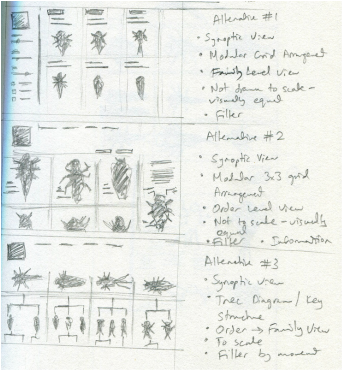
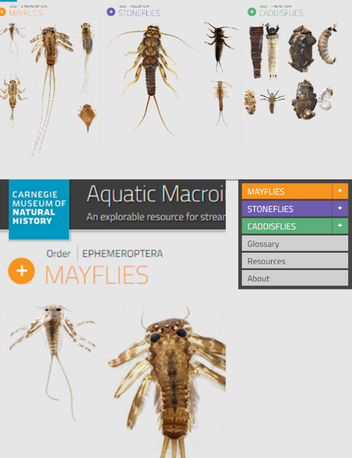
We are exploring redesign ideas by looking at different navigation strategies.  The homepage of the website is particularly important since it frames the way people approach the site and make sense of how it works. In this sense, questions like "Does the homepage reflect the structure of a key or a field guide? Does it gradually guide users step-wise through content by navigating a tree-like structure or does it give immediate visual choices and a less structured, pre-determined way to access to all the content? Whether the insects in the collection are being presented visually in the form of a list, a grid, or some other synoptic view become very important to structuring the following interactions with the site content.

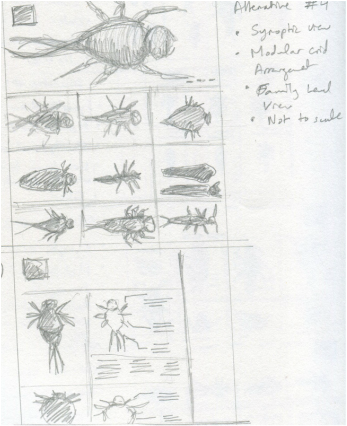
We have started this ideation process by sketching out several possible iterations of what a synoptic view homepage could look like. Sketching enables us a fungible way to quickly explore decisions like whether to use lists or grids views, have the insects appear uniformly  to scale, where in the interaction sequence to include family and genera level information, and in what stages of the ID process do different kinds of filtered and comparative views become important. 

These sketches are starting to explore different design variables:
a) grid vs list views
b) levels (order, family, genus)  displayed;
c) reckoning with scale considerations
d) search/ filter options at the home page level
e) comparative views selections

​This explorations are important to enable the project team to develop a shared vocabulary and set of inscriptions to discuss and debate the merits of different design solutions. 

Over the next few months our sketches will be translated into wireframes and mockups to get a better idea of how they might look as they get integrated into an interactive digital platforms.

Picture
Picture

Usability Studies: Design Insights & Implications

9/10/2016

 
By Ahmed Ansari.

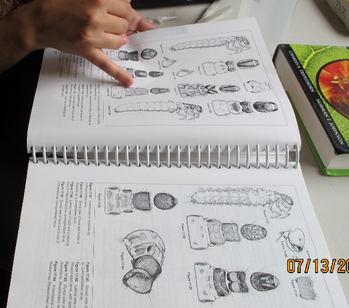
​We conducted five usability studies on the current website with trainers who work with training amateurs in entymological identification. Each usability study was conducted in two parts: an interview, where we asked the trainers questions about their background, how they conduct trainings, and difficulties and issues they face, while in the second part we conducted a usability study where they spent some time using and exploring the website.
​
Some of the key findings we gleaned from the interviews were:
1. Trainees generally find the terminology hardest to remember - often trainers will also customized training materials (powerpoints, flyers etc.) focusing on specific terms to make it easier for trainees to remember;
2. Trainers usually focus on insects local to the region and use guides and keys specific to local invertebrates;
3. Trainers said that exposure to the real insects in the stream, and material that showed insect movement and behavior really helped in getting people to remember.

​Over the course of the usability studies, we found that there were some clear divides between trainers in how they navigated around the software:
1. Half the trainers did not read the images on the home page as clickable, while the other half didn't click on the icons, reading them as visual imagery - we hypothesize that this correlates with the technical skill of trainers.
2. Only half the trainers actually noticed the menu on the home page and only one clicked on it to see through the various pages like the glossary, references etc.
3. Trainers correctly identified that the way images were displayed conveyed that one would move from order to family to genera
4. Trainers found the key characteristics helpful, although some thought that the terminology could be simplified, and found the videos particularly useful as a resource that would expose trainees to insect behavior in the wild. One trainer particularly enjoyed the audio interviews with experts a great deal.
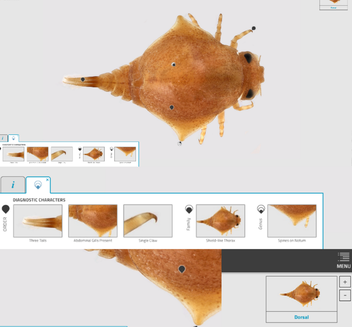
5. At the level of the gigapan images, trainers faced several problems - firstly, they were unable to distinguish between the various pins designating different levels of taxa. They were also unable to pick out the highlights on pins and thumbnails when a pin was selected.
6. The map in the top right corner was also often missed and some of the trainers had difficulties zooming in without a mousewheel;
7. Trainers liked the way clicking on pins centered the image and took them to specific anatomical features - one mentioned that a glossary like description on mousing over anatomy parts would be helpful.
8. Half the trainers said they wished that there was a way to have multiple views (dorsal\ventral or side), and to be able to compare insects of the same family.


Picture
Picture
Picture
Picture

Read More

Precedents for Macroinvertebrates.org Redesign

9/7/2016

 
In redesigning macroinvertebrates.org, we are focusing on three levels of the current system: the macro, or the architecture of the site, where pages go in relation to each other, and what the general structure and flow of the website is like - whether the site will be structured more like a key or a guide, for example. At the meso-level, our concern is with the interactions on the page – what the layout and structure of each page will be like, what content and how it will be available. At the micro level, we are concerned with the microinteractions, the various cues and feedback mechanisms that the user will encounter interacting with the site. 

Picture
Picture
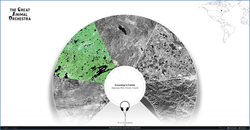
I’ve been assembling a list of precedents looking at macro and meso level strategies in dealing with content. The Great Animal Orchestra is a great example of a website that seeks to train people to listen and identify various biomes and animal sounds. It encourages the user to put on their headphones, and leads them through a selection of various regions, using circular spatial metaphors to slowly train users to isolate specific sounds. A multiple choice game that asks you questions about what you’ve just heard is an interesting way to evaluate if users are learning.
Picture
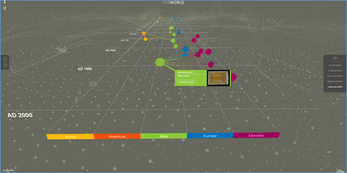
The British Museum’s website has an interesting way of isolating and highlighting various paths the user can take to view information. While the current site follows a chronological format, the user can isolate specific areas to view chronologies of. The website also uses overlays to give away information in a neat, concise manner.
Picture
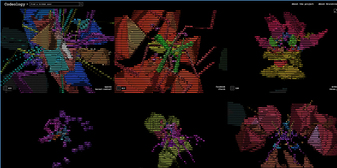
​Codeology is interesting because of the way that the grid structure is laid out, where hovering the mouse over a specific square causes it to animate and rotate. Possibly could be used as a precedent for interactions for the website where hovering over an insect square enlarges and magnifies it.
Picture
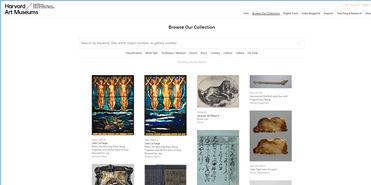
​The Harvard Art Museum website uses a more standard grid interface, but interestingly allow for panning and zooming into the high resolution images on the site.
Picture
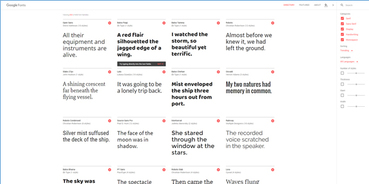
The Google font gallery uses a detailed sidebar with the ability to use sliders to change variables and update things in realtime. In addition to this, the various modules in the grid also allow for changing around variables and being able to see how the type changes and looks - this is really important as an example of how to manipulate and compare different images without necessarily diving in a level deeper.

    Project Team

    An interdisciplinary team
    ​of entomologists, learning scientists, software engineers and designers collaborating to improve macroinvertebrate identification training and technologies with volunteer biomonitoring organizations.

    Categories

    All
    Broader Impacts
    By Clemson
    By CMU
    By Educators
    By Powdermill
    By Stroud
    Design Studies
    Educator Innovations
    Entomology
    Imaging
    Learning Research
    Mobile App
    NSF REU
    User Research

    Archives

    June 2023
    September 2022
    April 2022
    August 2021
    May 2021
    April 2021
    January 2021
    December 2020
    September 2020
    August 2020
    July 2020
    May 2020
    November 2019
    August 2019
    July 2019
    June 2019
    May 2019
    April 2019
    March 2019
    February 2019
    January 2019
    October 2018
    September 2018
    August 2018
    June 2018
    May 2018
    March 2018
    December 2017
    August 2017
    June 2017
    May 2017
    April 2017
    March 2017
    December 2016
    November 2016
    October 2016
    September 2016
    August 2016
    July 2016
    June 2016
    May 2016
    April 2016
    March 2016

    RSS Feed

Powered by Create your own unique website with customizable templates.
  • PROJECT
  • PEOPLE
  • PRODUCTS
  • Blog
  • Resources
    • Help
    • FAQ